
How to Manage Bureaucratic Busywork and Delegated Drudgery Smartly
I am not an admin worker. I am not a clerk. I am not a systems administrator. Yet I found myself required to do these roles for a unit that flew by the seat of its pants.
The unit head did not believe in job roles, boundaries, nor did she seem to understand that specialized staff (who knew how to use a computer) do not necessarily know nor care about every feature or project that a computer user can accomplish.
I am an interactive multimedia developer with multiple degrees in computer science — one of which is a postgraduate degree in research. This did not apparently matter to those managing this project. As a result, I was put into a tedious situation.
The work that I was suddenly assigned featured enormous manual data entry and crude data analysis for student monitoring — all of which required quick weekly reporting to managers and more senior staff along the executive branch. Suffice it to say that this type of work was highly unusual for me, especially when it began to resemble the role of a call centre.
Why was I suddenly inserted into this role? Well, an outgoing senior manager wanted to end her career with a bang and cement some sort of legacy when the project was complete! That senior manager did not seem to know or care if the staff could manage, thus multiple staff members (such as myself) were pulled out of our regular duties to support this new and unique initiative.
I will not detail or mention what the initiative was. Within the scope of this story, it is irrelevant. For now, it is a literary device — like a MacGuffin.
It was proclaimed that I was to be the “Focal Point” for a platform I never heard of, nor ever used, and students were immediately sent to me to ask questions before I even logged in to see what the platform was about! It was not explained to me what “focal point” duties were!
Administrators of the online learning platforms had thick Spanish accents and required careful attention to understand what they were trying to say. At this point, I will include that the organization’s overarching project involved multiple online learning platforms that were alien to the organization’s local systems. In short, we were to administrate hundreds of students for a client across multiple disparate online learning systems.
The first challenge the organization had was the managing of the various staff members assigned to the task. Many were either unfamiliar with the task and each other, different age cohorts, non-technical, didn’t understand the operational dialogue, worked in a distributed capacity across various Caribbean islands and member states, worked in different departments, and from completely different cultures. It also did not help that internet access was inconsistent (for some).
Rapid staff repurposing and role compression was highly confusing. This was exacerbated by the fact that there was no central operational schema to handle the platform specific output. Limited guidance from management, as per what data would be useful to collect, led to widely fragmented workflows. Due to a clerical error, as staff were suddenly required to physically return to the workspace, there was no computer assigned to me at my workstation! Adding to this issue, my personal computer needed an overhaul — so I had to use my 13-year-old MacBook pro laptop to do my part.
The project was scholarship focused and required over 850 persons to be interviewed for successful matriculation to this unique program. Student names were compiled into a large Master list, from which platform sub lists were derived.
As this unique project was unusual for the organisation, there were no student IDs assigned either by this organisation or the online learning platforms to any of the matriculants. The only things that were aligned in both the platforms’ output and our enrolment lists were the students’ names and email addresses — and depending on the platform, emails were unseen. I was given the work of monitoring over 300 students on two different platforms.
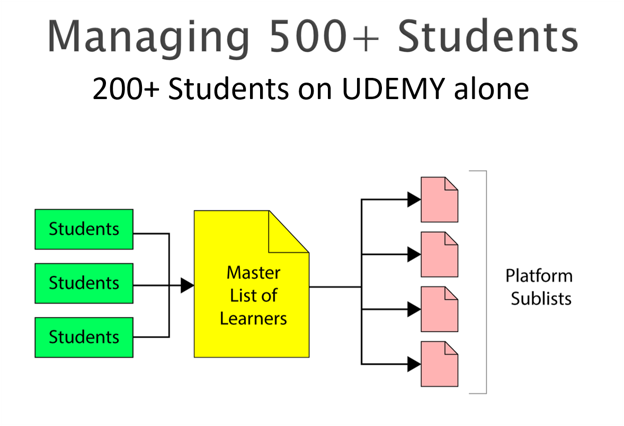
So, how to get the information per student? Well the first attempt was improvised survivalism.
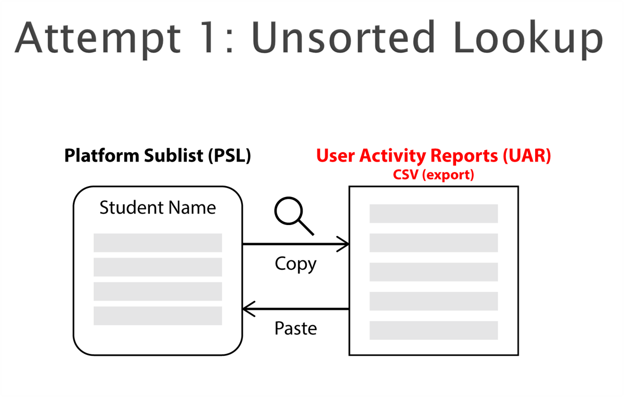
It required me to copy a name from the sub list, search for it in the platform’s user activity report (UAR), and copy back the information into the sub list. I can assure you that this is not only extremely boring, but for hundreds of records, this takes a very long time! I had to improvise and try something else.
Here is the second strategy:
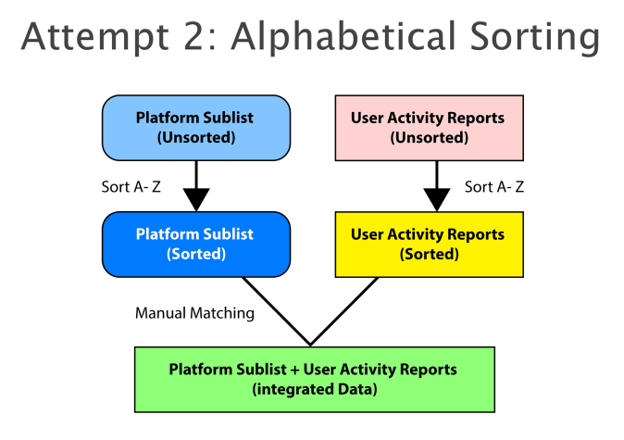
This simply says: sort both lists separately alphabetically. Match each row via name to the other. After which, integrate them into a single spreadsheet. This was a lot faster than the previous method.
Both manual approaches were essentially Brute-force search and key-based matching — but without algorithmic guarantees. These manual approaches worked, but they were still tedious, error-prone, and not scalable — especially when we also had to interpret the data for weekly reports.
So, I designed something better. Something much faster.
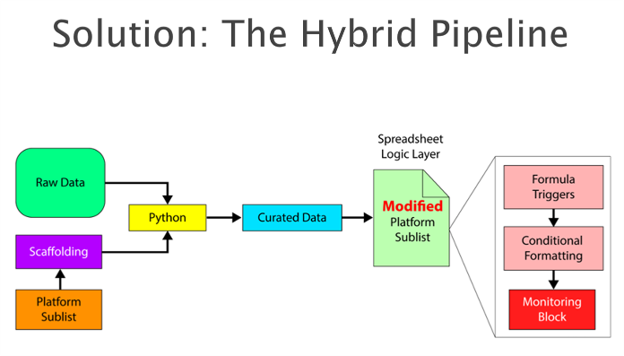
This is my hybrid pipeline. It uses Python to automate tedious data matching, then the obtained and cleaned data is fed into a smart spreadsheet that calculates performance and gives quick visual cues.
There is no AI involved here. This is simply human ingenuity doing what it does best. Use the old brain to design things that are both efficient and practical. This pipeline also keeps humans in the loop so you don’t ever feel as if some mega-AI is doing something that you are not sure is done correctly. Let’s look at it closer.
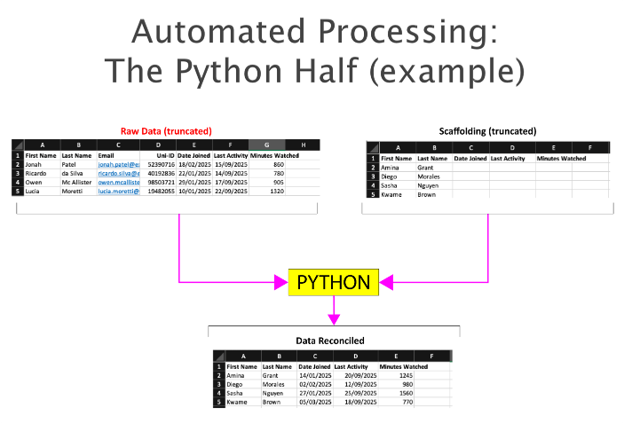
Here is the practical reality of the pipeline. On the left, we have our messy platform export; on the right, our clean scaffolding. In under five seconds, the Python bridges the gap to output a clean reconciled dataset. Let’s look at the python segment closer.
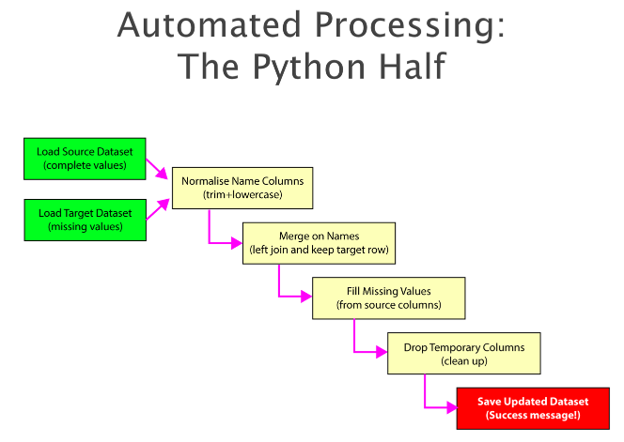
This is the logic of the python segment. At the onset, both the report from the platform, and the scaffolding file with rows of names are compared. The Python script handles the data normalization—trimming spaces and forcing lowercase—to completely bypass the human errors that plague manual matching. The required data is accurately extracted based on the column names you determined beforehand. When that process is done, a new file is created with the relevant data, waiting to be extracted to and inserted into the spreadsheet with awaiting logic for further processing.
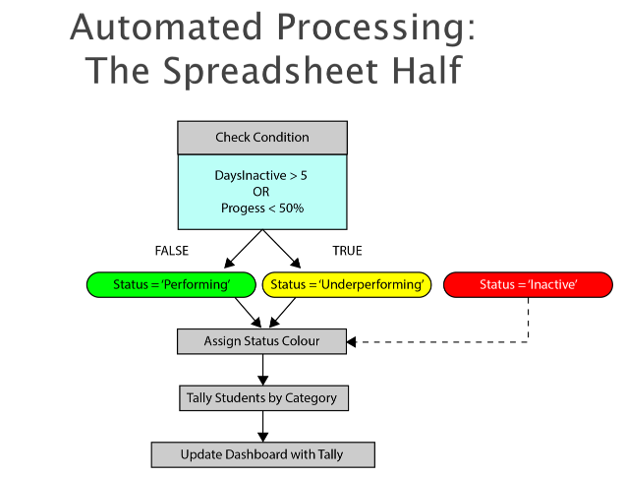
This is the logic of the spreadsheet segment. Established rules allowed the algorithm to quickly categorize, while simple conditional formatting allowed colour coding -- enabling at-a-glance insight into student engagement. It turned the raw data into something we could actually use during weekly reporting to management. It saved me a lot of time and made me sound predictably organized.
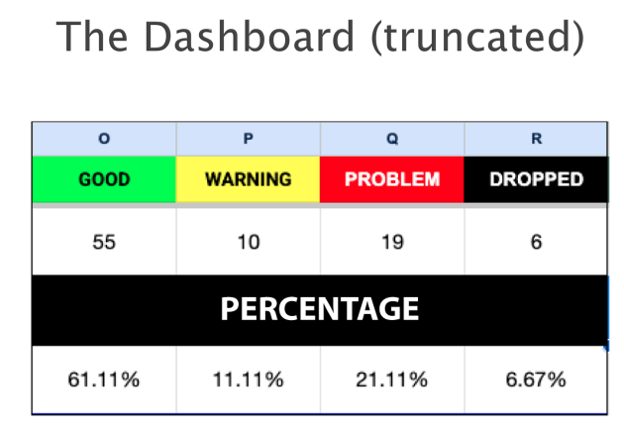
As an extension, I designed this section of the Dashboard to immediately tally the status of the students. As I was required to monitor over 300 people, it was untenable to spend time counting who was good, bad and ugly. So I had functions count that for me.
The whole process was simplified into this repeatable 5-step workflow:
- Download the platform data,
- Convert to UTF-8,
- Run the Python script,
- Inject the results into the spreadsheet, and
- Generate your report from the dashboard.
Minimal training needed — and it proved very reliable.
The real difference showed up in the comparison. I just want to make a quick reference to the three approaches.
· In the Unsorted look-up column, it was improvised survivalism that was non scalable.
· The alphabetical sorting was tactical but required training and vigilance due to possible misalignment.
· The python spreadsheet system required low cognitive bandwidth because it was automatic.
Unsorted Lookup took 180–240 minutes… Alphabetical Sorting took 37–42 minutes… but my Hybrid system took under 10 minutes – mostly for error checking. The actual time is closer to 5 minutes. Most impressively, the computational footprint was sufficiently small that it ran reliably on legacy hardware — namely a 13-year-old MacBook Pro with zero errors over 16 weeks.
Though not required for this project, multiple daily executions were easy and quick. The speed meant a single monitor could oversee multiple platforms concurrently and the lowered effort to do this kind of work allowed for better student engagement.
Why not simply use enterprise tools? Well, as I was in a resource-constrained environment, it was unlikely that any substantial financial investment would be supported. Enterprise tools require budget approvals, extensive security reviews, and steep learning curves for non-technical staff. In a resource-constrained environment, waiting for procurement means letting 500 students slip through the cracks today. We needed agility, not bureaucracy.
I offer at the very least a low-barrier, inexpensive system that is scalable, easy to teach and replicate. It reduced the effort of a very tedious task by 94 - 96 %.
What I learned from this endeavor was that modest automation developed on legacy computers can still contribute meaningfully to quality assurance (providing the logic is sound) …and speaking to transferability, this system can be adapted to any vendor CSV export!