
Introduction to File Upload Security
Introduction
File upload is one of the most common functionalities in modern web applications, but it can also be among the most dangerous ones when implemented incorrectly.
This article examines how attackers bypass upload restrictions, as well as best practices concerning the essential security controls developers should implement to prevent or mitigate these attacks. The article covers four objectives: identifying file upload validation vulnerabilities, understanding extension blacklist bypasses, understanding MIME type spoofing techniques and identifying secure file handling best practices.
What Is File Upload?
File upload is a feature that allows users to transfer files from their local device to a web server. It is essential for many web applications but can be exploited if not properly secured. Common uses include profile pictures, document sharing, form attachments, and content management.
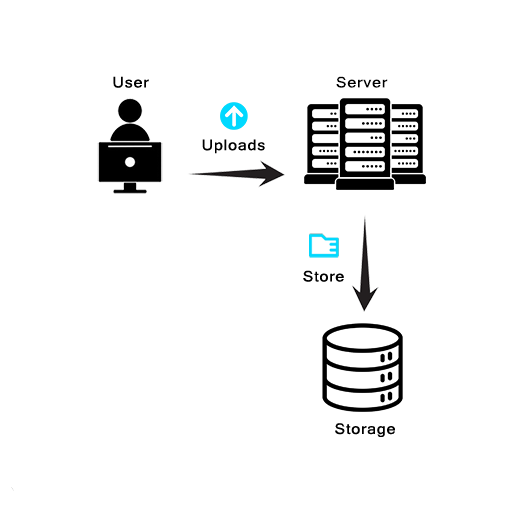
Figure 1 - The basic upload flow: a user uploads a file, the server receives it, and stores it.
Why are File Uploads Dangerous?
Malicious files can be uploaded and executed on the server, leading to system compromise. Attackers can exploit file upload vulnerabilities to compromise web servers in several ways.
The most critical risk is Remote Code Execution (RCE), the ability to run arbitrary code on a remote server, allowing attackers to take complete control of the system. Attackers upload malicious scripts often called web shells, that the server executes, enabling them to execute commands on the server.
What is a web shell: A malicious script (often PHP, ASP, JSP, etc.) uploaded to a web server, that provides attackers with remote command execution capabilities.
Other risks include:
· Data Theft: Stealing databases, passwords, credit cards, personal information.
· Defacement: Replacing original website content with attacker content and/or messages.
· Malware: Using the server to distribute viruses and/or ransomware.
To prevent these outcomes, web applications rely on validation. Validation can mainly occur on the client and on the server.
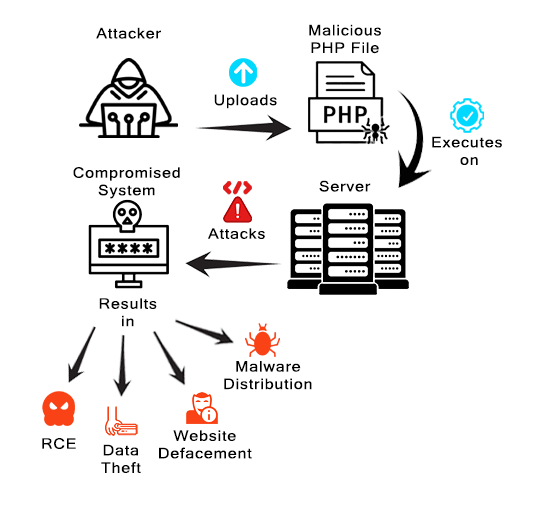
Figure 2 - A malicious upload executes on the server and results in a compromised system, leading to RCE, data theft, website defacement, and malware distribution.
Client-Side Validation
Client-side validation takes place in the browser using JavaScript. It checks file types before the upload even reaches the server. However, client-side validation is easily bypassed and should not be trusted alone, as attackers can disable JavaScript, modify the code, intercept the request or make direct API calls.
Common bypass methods: Disable JavaScript, modify HTML/JS code (DOM manipulation), use browser intercepting proxies (Burp Suite) or make direct API calls (curl, Postman).
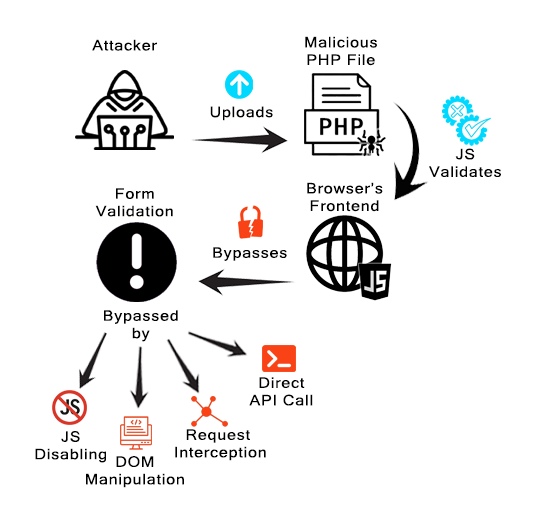
Figure 3 - Client-side validation runs in the browser and can be bypassed by disabling JavaScript, DOM manipulation, request interception or direct API calls.
Best practice: Use client-side validation for user experience only and never as the primary security control.
Server-Side Validation
Because client-side checks cannot be trusted, real enforcement must happen on the server.
Server-side validation happens on the web server after the file is uploaded. The server can check file extensions, MIME types, file size, and even inspect the file's actual content.
Server-side validation: Security checks performed on the web server after receiving the file.
Validation methods: Extension checking, MIME type verification, magic byte inspection, file size limits, malware scanning, and content analysis.
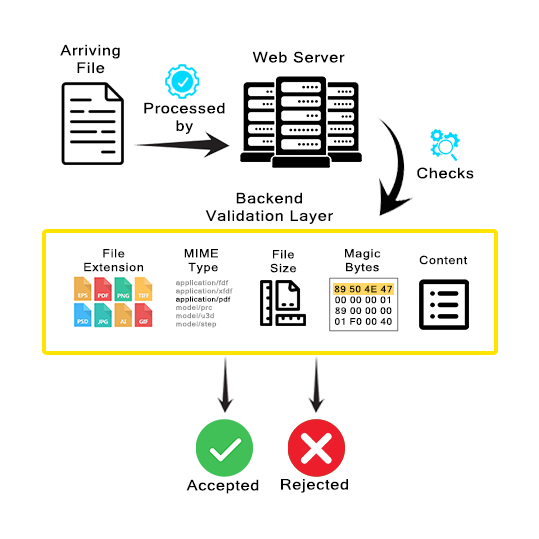
Figure 4 - The backend validation layer can check the file's extension, MIME type, file size, magic bytes, and actual content before accepting or rejecting it.
Best practice: Never rely solely on client-provided data. Server-side validation is more reliable than client-side but must be properly implemented to be effective.
However, even server-side validation can have flaws. Poorly implemented checks can still be bypassed. The following three sections examine three common bypass techniques: extension manipulation, MIME type spoofing, and magic byte/polyglot attacks, along with their defenses.
Bypass Technique 1: Extension Manipulation
Common mistakes include checking only file extensions or using blacklists instead of whitelists.
Blacklist: A list of blocked file extensions (e.g., .php, .exe).
Whitelist: A list of explicitly allowed file extensions (e.g., .jpg, .png, .pdf).
Web servers like Apache can execute multiple PHP-related extensions. If .php is blocked, attackers can try alternatives such as .php3, .php4, .php5, or .phtml.
Alternative PHP extensions: .php3, .php4, .php5, .php7, .phtml, all can execute PHP code.
Beyond PHP: Similar bypass techniques exist for other technologies: ASP (.asa, .cer, .aspx), JSP (.jspx, .jsw, .jsv), Perl (.pl, .cgi).
Another technique is using a double extension file (e.g., .php.jpg). If the server is misconfigured, such files may execute as PHP.
Double Extension Attack: Using two extensions (e.g., malicious.php.jpg) to bypass filters. Depending on server configuration, the file might be executed as the first extension (.php) while falsely appearing to be the second (.jpg).
Null Byte Injection (Historical): In legacy PHP <5.3.4, null bytes (%00 or \x00) terminated string processing. Example payloads: shell.php%00.jpg, malicious.php\x00.png, evil.php%00.gif, validated as images but saved/executed as PHP. Fixed in modern PHP but still found in legacy systems in production.
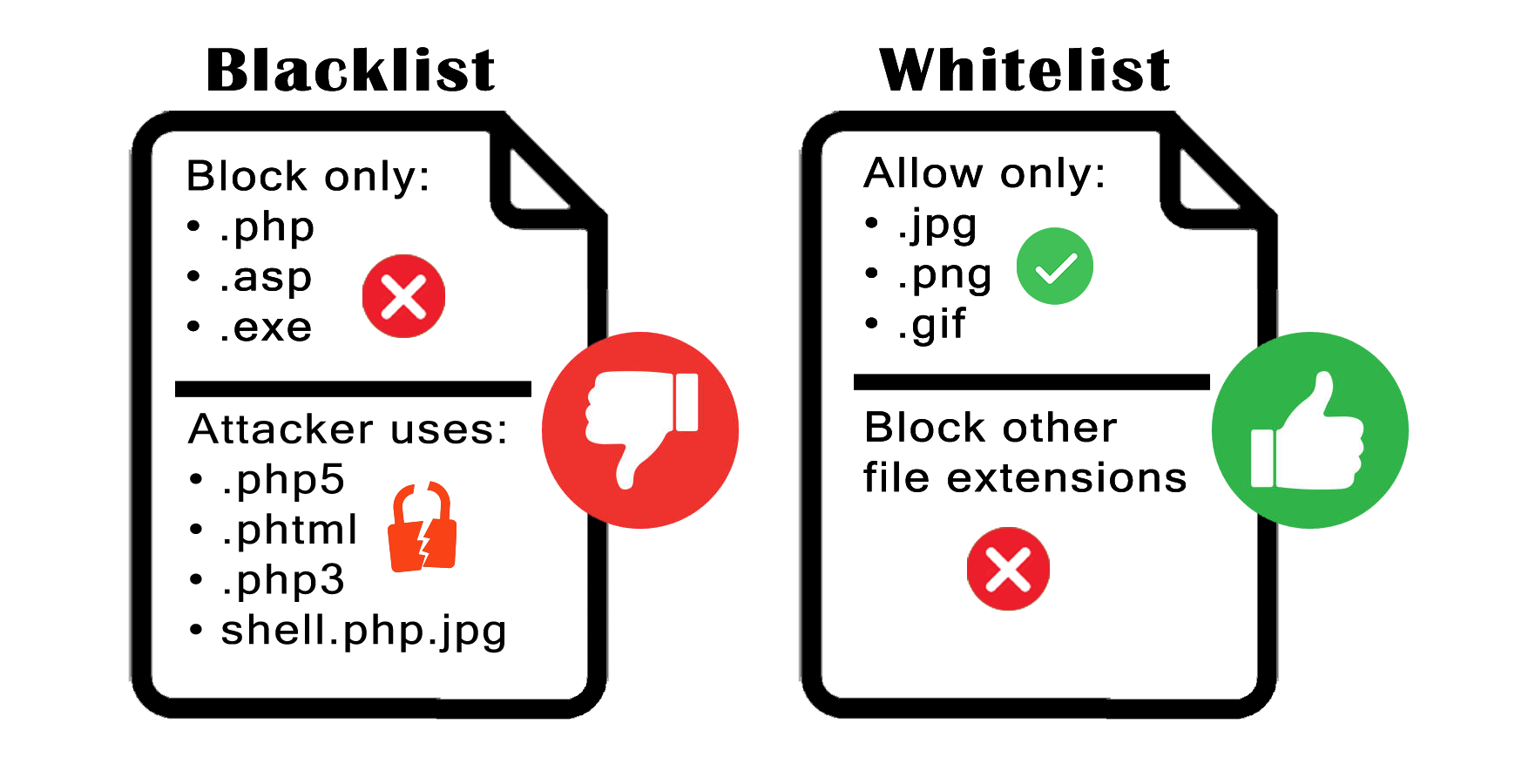
Figure 5 - A blacklist blocks specific extensions but attackers can use alternatives (.php5, .phtml, .php3); a whitelist allows only approved extensions and blocks everything else.
Best Practice: Always use whitelist validation when possible, as they are more secure than blacklists. Attackers find creative ways around blacklists using alternative extensions and encoding tricks.
Bypass Technique 2: MIME Type Spoofing
MIME types tell the browser what kind of content is being transferred, for example, image/jpeg, text/html, or application/pdf.
MIME Type (Multipurpose Internet Mail Extensions): A standard way of identifying file types on the internet. Sent in the Content-Type HTTP header. Examples: image/jpeg, application/pdf, text/html.
Some servers only check the Content-Type header to validate files, which is a security weakness. Attackers can easily modify the Content-Type header to claim a PHP shell is actually an image.
For example, uploading shell.php with Content-Type: image/jpeg may cause the server to accept it as a valid image.
Common image MIME types: image/jpeg, image/png, image/gif, image/bmp, image/webp
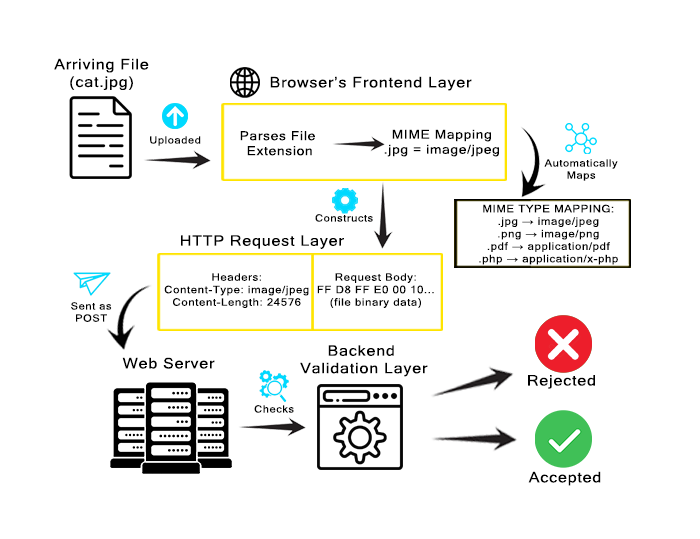
Figure 6 - The browser maps the selected file’s extension to a MIME type, places the resulting Content-Type value in the HTTP upload request, and sends the file bytes in the request body. The backend validation layer checks the upload before accepting or rejecting it.
MIME Spoofing Attack: Upload shell.php but set Content-Type: image/jpeg in the HTTP request to bypass validation that only checks the header.
Content-Type Header Manipulation: The HTTP Content-Type header can be modified using browser developer tools, intercepting proxies (e.g., Burp Suite), or command-line tools (curl).
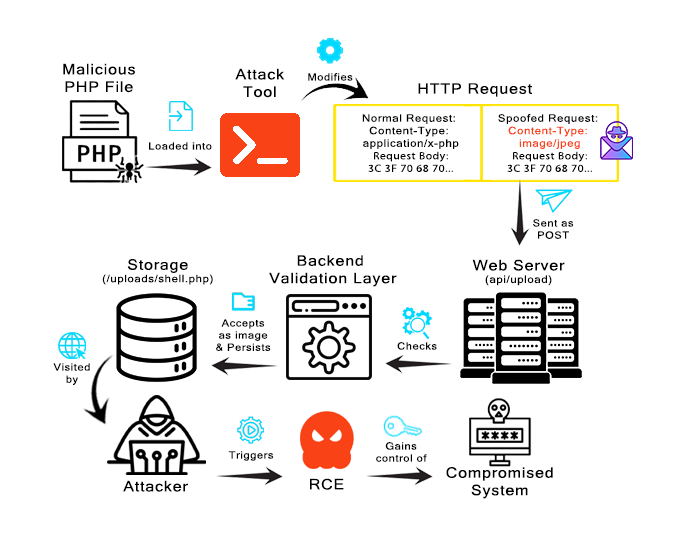
Figure 7 - An attack tool modifies the Content-Type header: the normal request declares application/x-php, but the spoofed request claims image/jpeg, so the server accepts the shell as an image.
Best practice: Never trust the Content-Type header alone for validation. Attackers can easily modify it to bypass checks. Always verify file content with magic bytes or other server-side methods.
Bypass Technique 3: Magic Bytes and Polyglot Files
Secure servers do not just trust extensions or MIME types alone, they also check magic bytes.
Magic Bytes (File Signature): The first few bytes of a file that identify its true format. For example, JPEG files start with FF D8 FF, PNG with 89 50 4E 47, GIF with 47 49 46. Magic bytes reveal the actual file type, regardless of extension or MIME type claims.
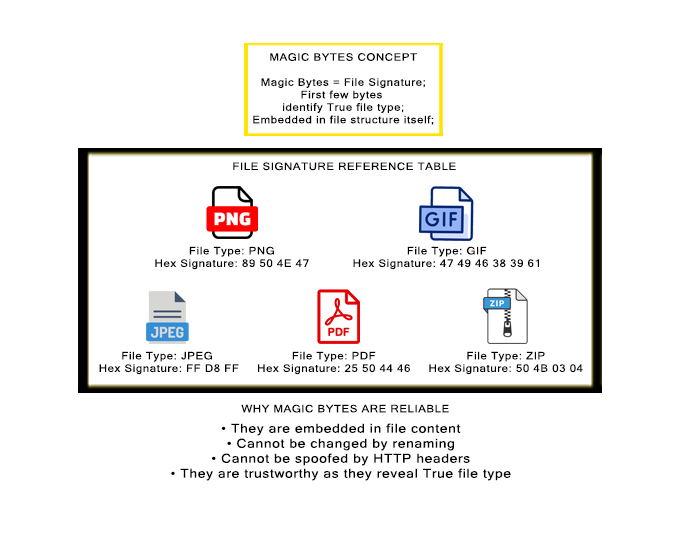
Figure 8 - File-signature comparison used during content-based upload validation, showing how common formats can be distinguished without relying on the submitted filename or declared MIME type.
Magic bytes are evidence of a file's format. However, they do not prove that the uploaded file is safe. Attackers have been using polyglot files to adapt to this defense.
Polyglot File: A file that is valid in multiple formats simultaneously. For example, a file that works as both a valid JPEG and executable PHP code.
How it works: The file starts with valid image magic bytes (e.g., FF D8 FF for JPEG), followed by appended PHP code. As a result, the file passes magic byte checks but can still execute as PHP if accessed correctly.
Creating polyglots: Use tools like exiftool to inject PHP in image metadata, or manually prepend magic bytes to PHP shells. Example: A file starting with GIF89a<?php system($_GET['cmd']); ?> is both a valid GIF and executable PHP.
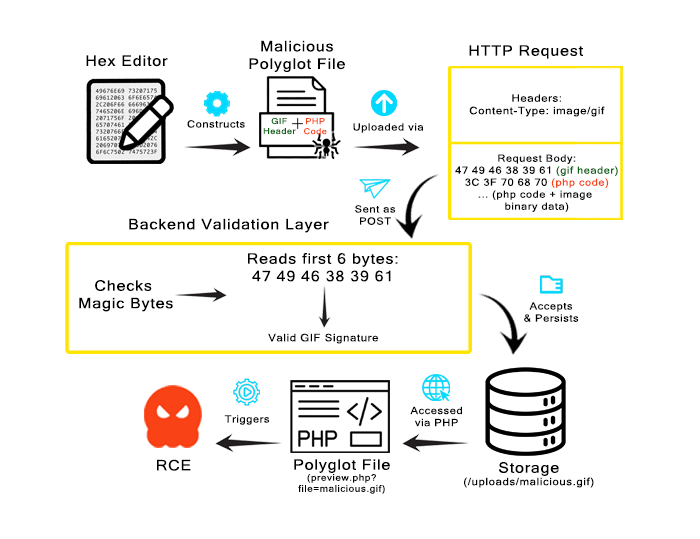
Figure 9 - A polyglot file starts with a valid GIF signature (47 49 46 38 39 61), passes the magic-byte check as a valid GIF and later executes as PHP when accessed, triggering RCE.
Best practice: Parse files with a trusted format-specific library and, where possible, decode and re-encode them into a clean canonical form. Strip unnecessary metadata and trailing data, reject malformed files, and ensure uploaded files are stored outside the web root in a location where script execution is disabled.
Secure File Storage
Validation is essential, but it is not enough on its own. An application must also store accepted uploads safely.
Web Root: The publicly accessible directory on a web server (e.g., /var/www/html/) where files can be accessed directly via URL.
If an uploaded file is stored inside the web root, an attacker may be able to access it directly. In a dangerous configuration, the web server may interpret and execute an uploaded script rather than serving it as harmless content.
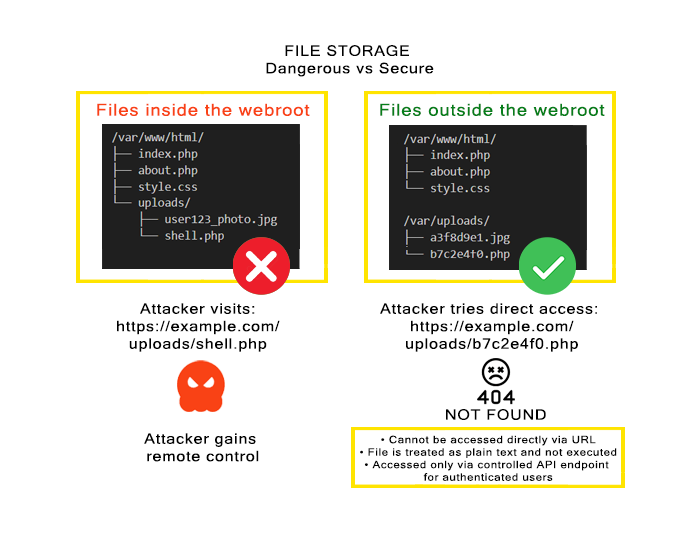
Figure 10 - Files inside the web root can be accessed directly via URL and executed; files stored outside the web root cannot be reached directly by URLs and return 404.
Best Practice: Store uploaded files outside the web root (e.g., /var/uploads/) and serve them through a script that validates permissions. This prevents attackers from directly accessing and executing malicious files via URL.
Defense in Depth
Having seen some of the most common bypass techniques (extensions, MIME spoofing and polyglots), it becomes clear that the appropriate response is defense in depth: a combination of validation methods (magic bytes + whitelist), secure storage (outside webroot), access controls, size limits, malware scanning, and proper permissions. If an attacker bypasses one layer, the remaining controls can still prevent or limit the attack.
Final best practice: Apply defense in depth by combining multiple security controls throughout the upload process rather than relying on any single validation method.
Summary:
The key security principles can be summarized as follows:
1. File upload vulnerabilities can lead to Remote Code Execution and other critical security risks.
2. Attackers bypass defenses using extension manipulation, double extensions, MIME spoofing, magic byte injection, and polyglot files.
3. Client-side validation and user input can never be trusted; validation must always be performed on the server side.
Ultimately, secure uploads demand defense in depth: layered protection combining whitelist validation, magic byte verification, secure storage outside the web root, random filenames, size limits, and malware scanning.
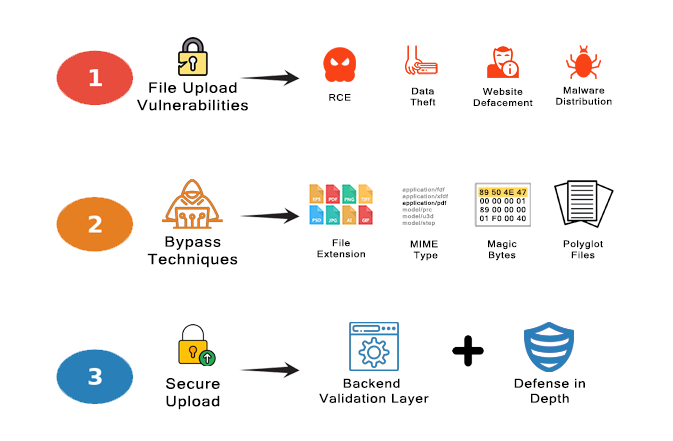
Figure 10 - (1) file upload vulnerabilities and their impact, (2) the bypass techniques, and (3) secure upload through a backend validation layer plus defense in depth.
Security Best Practices Summary
✓ Use client-side validation for user experience only and never as the primary security control.
✓ Perform file upload validation on the server side.
✓ Use whitelist validation, not blacklist validation.
✓ Never trust the Content-Type header alone for validation.
✓ Check magic bytes, not just file extensions.
✓ Parse files with a trusted format-specific library and, where possible, decode and re-encode them into a clean canonical form.
✓ Strip unnecessary metadata and trailing data, and reject malformed files.
✓ Store uploaded files outside the web root.
✓ Serve uploaded files through a script that validates permissions.
✓ Never execute uploaded files directly
✓ Apply defense in depth by combining multiple security controls rather than relying on a single validation method.
Ethical note: The techniques described in this article, shall only be used in an ethical manner, solely for authorized security testing and education purposes.
Further Reading:
File Upload Exploits - Interactive Cybergame